Summer 16x20 Welcome Sign Mockup: The Perfect Display Tool
You’ve spent hours perfecting the layout, adjusting the kerning, and selecting the perfect script font for a wedding welcome sign. It’s a beautiful piece of graphic design, but showing it to a client as a flat, white rectangle on a screen lacks impact. The gap between a digital file and a physical product is significant, and bridging that gap is where a high-quality mockup becomes your most valuable asset. This is exactly why a realistic presentation tool for your designs is so crucial.
A Realistic Setting for Your Designs
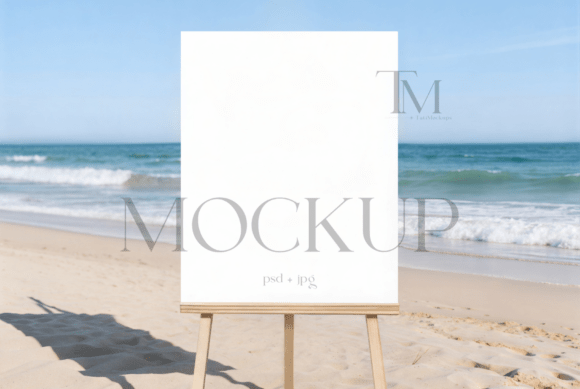
The Summer 16x20 Welcome Sign Mockup is designed to solve that presentation problem. It places your artwork into a context that feels instantly familiar and aspirational: a sun-drenched outdoor easel, ready for a garden party or a rustic-chic wedding. The 16x20 inch dimension is a standard for event signage, making this mockup directly applicable to a huge range of client projects. What makes it visually appealing isn't just the setting, but the attention to detail—the texture of the easel, the subtle shadows, the natural light. It tells a story before anyone even reads the words on the sign. This isn't just a template; it's a scene setter that helps your clients visualize the final product in their own environment.
Practical Applications for Designers and Entrepreneurs
For a graphic designer, this mockup is a versatile addition to your toolkit. Its primary use is clear: showcasing wedding entrance signage, bridal shower posters, and garden event decorations. But its utility extends far beyond that. Think about a small business owner launching a summer pop-up shop. A welcome sign mockup can present their event details professionally on social media. A stationer can use it to display a new collection of wedding suite designs in their online portfolio, adding depth and context that a simple PDF cannot provide.
Consider these practical scenarios where this asset shines:
- Client Presentations: Show a wedding planner or a bride-to-be exactly how their custom sign will look at the venue, boosting their confidence and speeding up approvals.
- Portfolio Enhancement: Replace flat lay images with realistic, environmental shots. A sign shown on an easel in a garden feels more premium and professional than one floating on a white background.
- Social Media Marketing: Create engaging posts for Instagram, Pinterest, or Facebook that stop the scroll. A beautiful, styled image of a welcome sign is perfect for promoting your design services for events.
- Website and Blog Graphics: Use it as a featured image for a blog post about wedding signage trends or as a hero image on a services page to illustrate your work in a real-world context.
- Digital Product Sales: If you sell printable designs on Etsy or your own site, this mockup can dramatically increase the perceived value and appeal of your listings, leading to higher conversion rates.
Streamlining Your Creative Workflow
Time is a non-renewable resource for any creative professional. The true value of a well-crafted mockup lies in its ability to save you time while elevating your output. This particular file is structured with efficiency in mind. The layered PSD file includes a smart object layer, which is a game-changer for seamless editing. Instead of wrestling with perspective transforms and clipping masks, the process is straightforward.
Here’s how it simplifies your work:
- Open the file in Photoshop or a compatible editor like Photopea.
- Double-click the designated smart object layer.
- A new window opens where you can simply drag and drop your 16x20 inch design.
- Save that smart object layer, and your artwork instantly and perfectly conforms to the sign’s shape, complete with realistic lighting and shadows.
This process takes minutes, not hours. It allows you to generate multiple presentation options for a single design quickly, giving clients more choice and showcasing your versatility as a designer. The inclusion of a high-resolution JPG file also provides a ready-to-use image for quick shares or when a fully editable file isn't necessary.
Key Considerations for Professional Use
While this mockup is a powerful tool, using it effectively requires a professional mindset. First, understand the licensing terms. This asset is for incorporating into your business or personal projects—like client work, portfolio pieces, or marketing materials. Reselling the mockup file itself as a standalone product is not permitted. Always ensure your final design, which you place into the mockup, is your original work or properly licensed.
Second, pay attention to the details of your own design within the mockup. A beautiful presentation can be undermined by a poorly kerned headline or low-resolution graphics. Use this as an opportunity to double-check your typography and image quality. The mockup’s realism will highlight any flaws in your artwork, so it can serve as a final quality check.
Finally, consider the broader context of your brand identity. If your design business has a minimalist, modern aesthetic, you might use this mockup but present it with clean, simple typography and a muted color palette. If your brand is more rustic and organic, lean into the natural elements of the scene. The mockup is a flexible canvas; your application of it should still align with your overall visual language.
In the end, the goal is clear communication. You’re not just showing a picture of a sign; you’re demonstrating your ability to deliver a complete, polished product that exists in the real world. By using a contextually rich and easy-to-edit presentation tool, you bridge the digital divide, build client trust, and ultimately present yourself as the seasoned professional you are.